FAT32 File System Guide - Everything You Need to Know
Have you guys ever thought why FAT32 is still utilized, despite the availability of newer file systems such as exFAT and NTFS? If you're curious about how FAT32 works and why it's still so popular today, you've come to the correct spot.
FAT32 is one of the most common file systems for USB sticks, SD cards, and external storage devices. Even though newer formats such as exFAT and NTFS are now available, FAT32 remains a popular choice due to its high compatibility with a wide range of devices and operating systems.
From bootable USB drives to game consoles & memory cards, FAT32 continues to play a key role in contemporary computing.
Many users also rely on FAT32 Format Tools to swiftly format storage devices and generate FAT32 partitions that are suitable without requiring technical knowledge.
This guide explains what FAT32 is, how it works, its benefits and drawbacks, and when it should be used.
What Is FAT32?
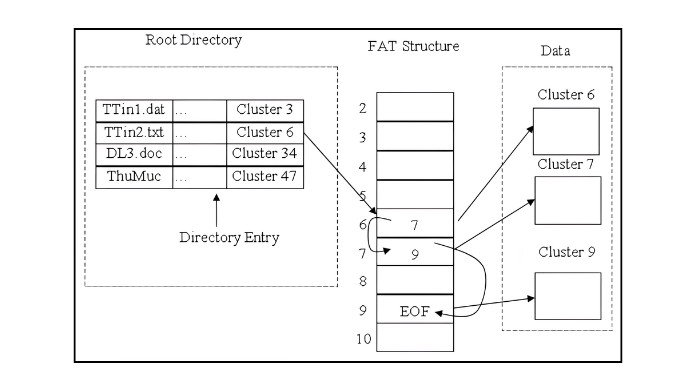
FAT32 stands for File Allocation Table 32. It is a file system created by Microsoft and launched in the 1990s as an enhanced version of the previous FAT16 format.
A file system is in charge of arranging, storing, and managing files on storage devices like:
- USB flash drives
- Memory cards
- External hard drives
- Portable SSDs
- Older computers and gaming systems
FAT32 gained popularity because it worked across a variety of platforms, including Windows, macOS, Linux, webcams, smart TVs, game consoles, and automotive entertainment systems.
Why FAT32 Is Still Popular?
Despite being an outdated file system, FAT32 is still popular due to its high compatibility.
1. Works on Almost Every Device:
One of the most significant advantages of FAT32 is its global support. Most operating systems and devices can read and write FAT32-formatted disks without requiring additional software.
This makes it ideal for:
- Bootable USB drives
- Gaming consoles
- Car media systems
- Smart TVsCameras and drones
2. Perfect for Small Storage Devices:
FAT32 is compatible with SD cards and smaller USB storage devices. For media playback and firmware updates, many devices still need FAT32.
3. Easy to Format:
Most operating systems support rapid FAT32 formatting using built-in utilities or third-party formatting applications.
FAT32 Limitations
Although FAT32 is reliable, it has some disadvantages compared to modern file systems.
1. Maximum File Size Limit:
- The main disadvantage is the 4GB maximum file size limit.
- The maximum file size is 4 gigabytes (GB).
- This means that you cannot keep a single file greater than 4GB on a FAT32 drive.
- Large 4K films, games, ISO files, and backups may not copy properly.
2. Partition Size Restrictions:
Windows' built-in formatter normally limits FAT32 formatting to partitions up to 32GB, while larger FAT32 partitions can be created with third-party programs.
3. Lower Security Features:
FAT32 does not support:
- File permissions
- Encryption
- Journaling
- Advanced recovery features
As a result, it is less secure and more dependent on newer desktop computers.
FAT32 vs exFAT vs NTFS
Here is a simple comparison of the three popular file systems:
| Feature | FAT32 | exFAT | NTFS |
|---|---|---|---|
| Compatibility | Excellent | Very Good | Mostly Windows |
| Max File Size | 4GB | Very Large | Very Large |
| Security Features | No | Limited | Advanced |
| Best For | USBs & SD Cards | Large Flash Storage | Internal Drives |
| Journaling | No | No | Yes |
If you need interoperability across a wide range of devices, FAT32 is still an excellent choice. However, for huge data and modern storage requirements, exFAT or NTFS may be preferable.
Common Uses of FAT32
1. USB Flash Drives:
FAT32 is a typical format for portable USB storage devices. USB drives are widely compatible with PCs, game consoles, smart TVs, and other media devices.
2. SD Cards:
FAT32-formatted memory cards are still required by many cameras and embedded systems. For photographers, portable devices, and outdated hardware that may not support newer file systems, FAT32 is a fantastic choice.
3. Gaming Consoles:
A number of gaming systems support FAT32 for updating and playing media. When transferring game files, screenshots, or firmware updates between devices, many users also format USB drives to FAT32.
4. File Sharing Across Devices:
FAT32 allows users to transfer files between operating systems without compatibility difficulties. It is especially handy for users who frequently switch between Windows, macOS, Linux, and other smart devices.
How to Format a Drive to FAT32?
Formatting a drive to FAT32 is usually simple.
Step 1: Connect the USB drive
Step 2: Open File Explorer
Step 3: Right-click the drive
Step 4: Select “Format”
Step 5: Choose FAT32
Step 6: Click Start
Many people use FAT32 Format Tools to create FAT32 partitions without complex settings when Windows is unable to format larger devices.
Is FAT32 Still Worth Using Today?
Indeed, FAT32 is still helpful in many cases. If you value compatibility over advanced capabilities, FAT32 remains one of the best options for portable storage.
However, if you regularly work with:
- Large video files
- Modern games
- System backups
- Professional workloads
Then exFAT or NTFS will usually provide a better experience.
Final Thoughts
FAT32 is an outdated file system, yet it still serves a vital purpose in modern computing.
Its simplicity, dependability, and broad compatibility make it suitable for USB drives, memory cards, and portable storage devices that run on multiple platforms.
While it has restrictions, such as a 4GB file size limit, FAT32 is still one of the most useful formats for consumers who require maximum device compatibility and convenient file sharing.
About the Author
Hello, my name is Bran Bolton, and I'm a computer enthusiast & storage technology writer who enjoys writing about file systems, USB drives, & PC storage.
I enjoy giving readers clear, useful explanations to help them understand contemporary technologies and storage devices.
I hope you gained more knowledge about FAT32 from this essay, and I would be interested in hearing your opinions and experiences.
Reference:
Paul’s 8051 Code Library: Understanding the FAT32 filesystem. (n.d.). https://www.pjrc.com/tech/8051/ide/fat32.html
EncryptionEncryptionEncryptionEncryptionISO files
